Tuesday, February 11, 2014

#10 - Vanishing Point

The 10th Day in Principles of Design and Color Theory

What I've learned today is about Vanishing Point in editing images in Adobe Photoshop. It is all about perspectives during editing. You can insert a lot of images and the place will depend on the object's perspective. Example: You have a picture you want to edit with the walls appear at the left, right, and front of you, and this includes the ceilings and the floor. Then, you'll have to use Vanishing Point to get the perspectives of the walls, the ceiling, and the floor. Then, inserting images during the vanishing point is possible. So, that makes every images inserted is according to the perspective of the walls, floors, and ceilings. It is a lot impressive to me. And, here's my work for Vanishing Point:


"The Vanishing Exhibit"

"Vanishing" It is because that I used Vanishing Point filter tool in Photoshop. "Exhibit" It is because it is an art exhibit anyway. The things I did in this edit: Mainly, I replaced the original artworks in the original photo with my artworks, and also my friend's artworks. I used Vanishing Point to find the perspectives of the front wall, the left wall, and the right wall. Then I replaced and replaced. I just left the reflections in the floor. This edit can be done in Move Tool. But, I used Vanishing Point to find and edit this with perspectives.

Tuesday, January 28, 2014

#09 - Typography

This is the ninth day in Principles of Design and Color Theory. What I've learned today is about Typography. It is kinda bit surprising that there are a lot of parts of typography such as ascender, descender, base-line, etc. And I've remembered the Serif and the Sans Serif just like back in the 1st semester in Comm. Tech. here's my work for typography:

"Do not conform to the pattern of this world, but be transformed by the renewing of your mind. Then you will be able to test and approve what God's will is-His good, pleasing and perfect will."
--- Romand 12:2

What I did is in some lines: I kern them into the margins left and right. The others are resized. The common words are resized.

#06 - Multimedia File Types and Vectors

The 6th day in Principles of Design and Color Theory.

Multimedia File Types

Images

There are a lot of  file types for images: JPEG, PNG, GIF, PSD, TIFF, BMP, etc. These are commonly used.

  • JPEG: Joint Photographic Experts Group. JPEG is commonly used for photography and method of lossy compression. It uses 16.8 million colors. It loses quality but in a smaller file size.
  • PNG: Portable Network Graphics. PNG is a raster graphics file format that supports lossless compression. It also uses 16.8 million colors. It stays in its quality but having a large file size.
  • GIF: Graphics Interchange Format. GIF is commonly used for animation and it is also known as the moving picture. But it uses 256 colors.
  • PSD: Photoshop Save File/Photoshop Document. PSD is commonly used for Adobe Photoshop in editing images/animations by layer to layer. This can be the best file type in editing pictures but only supported in Adobe Photoshop.

Videos

There are also a lot of file types for videos: MP4, AVI, 3GP, MOV, MPEG, WMV, FLV, etc. These are also commonly used for videos.

  • MP4: Moving Picture Experts Group 4. MP4 is one of the most common video file types. This is the video counterpart of JPEG. The video has the same quality as JPEG and is lossy. MP4 are also in smaller file size.
  • AVI: Audio Video Interleave: AVI is also one of the most common video file types. AVIs are commonly used for burning into DVD recordable disks. It has a right quality, maybe loseless, but in a very high file size that can exceed gigabytes (GB).
  • 3GP: 3GPs are commonly from mobile phones. However it has a small file size and low quality but the size and quality is depending on the phone's camera.

Music


MP3, AAC, and OGG are sampled for music file types. MP3 are best known for music types and very most common. Music file types are also embedded in video file types so that makes the video mixed up with music. Without a music, the video doesn't play any sounds just visuals.


Vectors

I've also learned about vectors. Not the vectoring of faces of figures. It is about the shapes in Photoshop. Vectoring is mostly in Adobe Illustrator than Photoshop. In Photoshop, they are just the shapes and texts. Here one of my work for vectoring:


#08 - Kuler and Blending

Kuler


Here's my work for Kuler. It is very impressive using analogous of blue properties with a cool title for such cold concepts.

Colors used:
#2C63E3
#2832D9
#1D7CCC
#15B7E3
#14D9D2

Blending


Here's my work for blending modes. The combination is the two pictures below:

Layer 1

Layer 2

In layer arrangement, Layer 2 is above from Layer 1. I used the blending modes for Layer 2. I used the Linear Light blending mode. So that makes the Layer 2 fused with Layer 1,

Tuesday, January 7, 2014

#07 - Examining Forms of Brushes and Texts in Pen Tool

Raileys presents:

"Beware of Doge"


TADA!!!

I just combined the things I've learned for today and Such edit Hehe! Lol! ... Well, I've learned about the Brush settings in Adobe Photoshop. Well, I've explored a lot and learned about sizes, hardness and the other settings for the appearance of the brush. It is a lot useful for my experiments in Photoshop in these days. And I've also learned about Text tool through pen tool. So, I've made a triangular texts like what I did to the picture above.

Here's one for blending modes:


Tuesday, December 17, 2013

#05 - Some Activities

This is our activity about Business Cards. The only note is that some of the informations written in the business cards may not be real but don't even try to memorize it.


#1 - It is readable even it is printed in smaller sizes and farther. It is almost black and white but with red, blue, and yellow.


#2 - This one is same as the first one. Still readable in smaller parts. This one is black and white and I changed the positions of the text and the rectangular background.


#3 - This one is something difficult to see than the previous two. This is related to the first one I made but the differences are the background---I made it orange---and reversed the blacks and whites from the first one. Well, as I said that this one is so difficult to see. But I made it to see some differences.


Tuesday, December 3, 2013

#04 - Understanding Color Spaces

Day four in Principles of Design and Color Theory class. Today is understanding about Color Spaces.

A figure of known Color Settings.

These are the five of the best known color spaces:

  • ProPhoto RGB
  • Adobe RGB 1998
  • sRGB
  • CMYK
  • Lab Color Space


ProPhoto RGB
--- The ProPhoto RGB is an output referred RGB color space. It is developed by Kodak. It offers an especially large gamut designed for use with photographic output in mind. This encompasses over 90% of possible surface colors in the CIE L*a*b* color space, and 100% of likely occurring real world surface colors making ProPhoto even larger than the Wide Gamut RGB color space. This primaries were also chosen in order to minimize hue rotations associated with non-linear tone scale operations. One of the downsides to this color space is that approximately 13% of the representable colors are imaginary colors that do not exist and are not visible colors.


Adobe RGB 1998

--- The Adobe RGB color space is an RGB color space developed by Adobe Systems in 1998. It was designed to encompass most of the colors achievable on CMYK color printers, but by using RGB primary colors on a device such as the computer display. This encompasses roughly 50% of the visible colors specified by the Lab Color Space as well as improves upon the gamut of the sRGB Color Space, primarily in cyan-greens.


sRGB

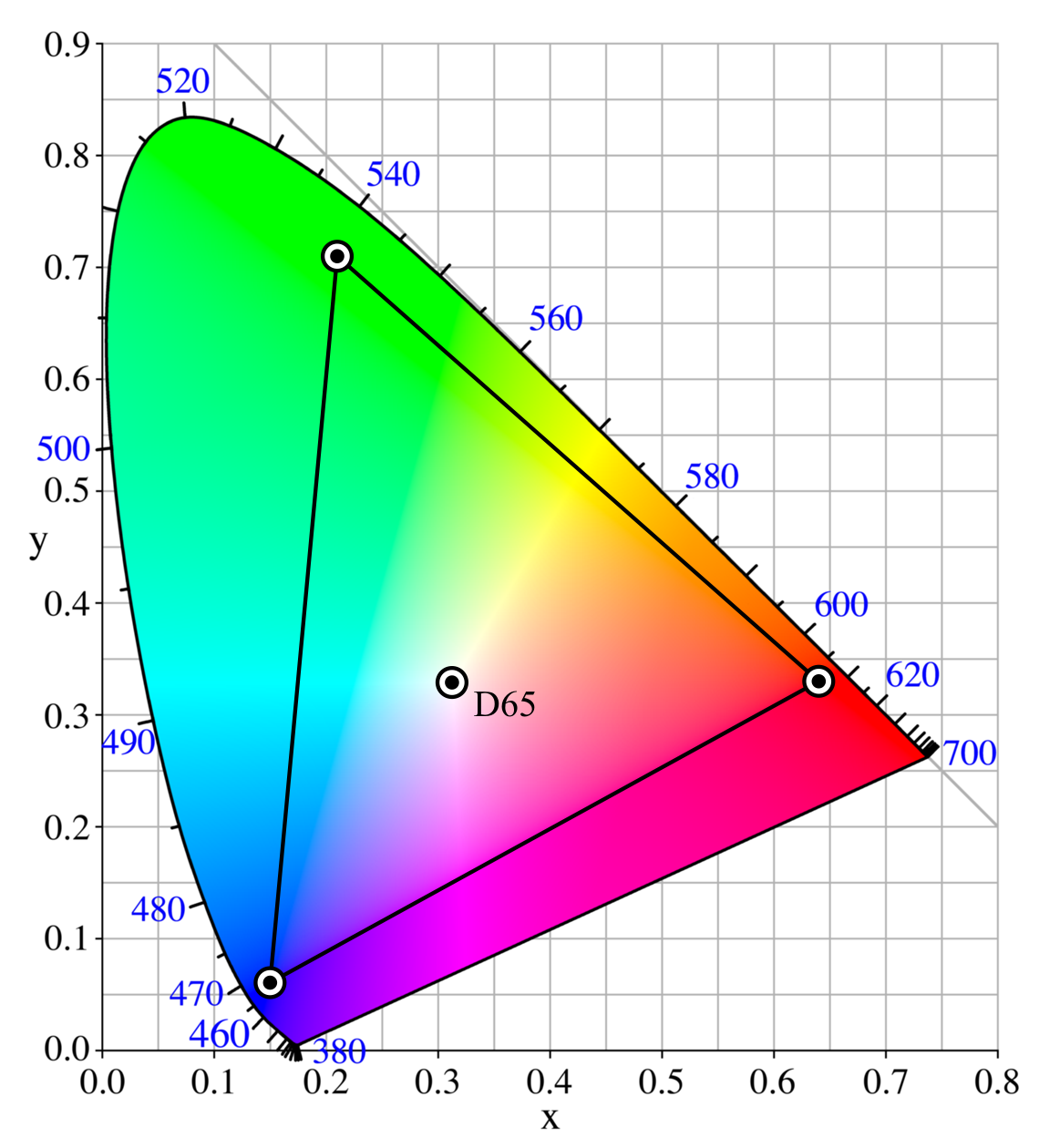
--- The sRGB is a standard RGB color space created cooperatively by HP and Microsoft in 1996 for use on monitors printers and the Internet. It uses the ITU- BT.709 primaries, the same as are used in studio monitors and HDTV, and a transfer function (gamma curve) typical of CRTs. This specification allowed sRGB to be directly displayed on typical CRT monitors of the time, a factor which greatly aided its acceptance. Unlike the other RGB color spaces, the sRGB gamma cannot be expressed as a single numerical value.


CMYK

--- The CMYK is a subtractive color model used in color printing and it is also used to describe the printing process itself. This refers to the four inks in some color printing: Cyan, Magenta, Yellow, and Black. Though it varies by print house, press operator, press manufacturer, and press run, ink s typically applied in the order of the abbreviation. The "K" in CMYK stands for key because in four-color printing, they are carefully keyed or aligned. It may be derived from the last letter of the word "black" because of being the last letter of the word black is "K".


CIELAB color space

--- The CIELAB (CIE L*a*b*) color space is a color-opponent space with dimension L for lightness, and a and b for the color-opponent dimensions. This was defined by the Comission Internationale de l'Eclairage (CIE). In 1931, CIE defined the CIE XYZ color space, which represented all possible colors based on human perception. Like RGB, CIE XYZ has three orthogonal dimensions however XY&Z do not correspond to real colors. They are simply mathematically convenient with Y carrying the luminance information. CIE is usually represented by a 2D "chromaticity diagram" obtained from the CIE XYZ model. The CIE XYZ model and chromaticity diagram are the perceptually uniform. A more uniform version of CIE defined in 1976, officially known as CIE L*a*b*. "L" stands for luminance and again light. "A" stands for the red-green axis. And, "B" stands for the blue-yellow axis. The asterisks were added to differentiate CIE from another L,a,b model.


What I understand most:

  • In Lab color space, it is entirely the colors present in the human world, all colors what I see I think.
  • The CMYK are for printing.
  • The sRGB are standard computers used for monitors and mostly in the internet.
  • The Adobe RGB of 1998 are somehow its colors are successful in CMYK.
  • The ProPhoto RGB are from photographs.
I understand a lot and it helps me a lot in exploring and learning colors.